Category Archives: Cybersecurity

“Thinking Cyber” Final: A Few Security Tips

by Jim Havron (Independent Archival Consultant)

One of my favorite Dilbert cartoons has the engineering hero explaining to upper management that he has found the source of the problem in their system. “It’s people. They’re buggy.” http://dilbert.com/strip/2015-04-24

Techies have a similar truism, “it’s not the technology, it’s the people.” This is not entirely true of course. Technology fails. But the IT Policy Compliance Group recently reported 75% of all data loss is the result of human error, and other information security research resources state between 52% and 64% of major security breaches have human error as the root cause. (Aberdeen Group and CompTIA, for example.) This suggests that there is something we can do to help keep our electronic records safe. If we can reduce the human error, risk decreases.

Once again I repeat my basic premise, stated in previous posts:

It is the archivist that is responsible for the preservation and accessibility of electronic records under their care. When a donor places his/her records into an archivist’s custodianship, the donor expects the archivist to know how to keep them safe and make them accessible. If a donor is considering giving a database as part of his/her papers, but wants to be assured that you can keep the confidential material in the database confidential, make sure that the records will be maintained over time, and made available to those who should have access, can you explain how you will assure all this? Well, obviously not in great detail, unless you are the IT professional who will care for them, but perhaps you can assure the donor that you are taking reasonable steps to protect these electronic resources.

I repeat my premise frequently because in my personal experience, archivists, like others, assume that IT is the one that is responsible for cybersecurity. While this is true on one level, the largest problem with being a cybersecurity consultant or staff member is persuading people to think about cybersecurity and act upon what they know. I recently spent hours on the phone and remotely accessing computers, in attempts to help people who had suffered data loss directly attributable to failures to follow professional advice given in the past couple of years.

That being said, I am not the only person trained in cybersecurity who I know that has almost fallen for some of the basic attacks or struggled with maintaining basic security habits. When I am in archivist mode, or any mode other than “security professional,” it is easy to fall into old habits, particularly when distracted. That is why I suggest learning to “think cyber.” I suggest developing habits that strengthen our abilities to electronically secure in the same way that we would notice a vinegar smell or dampness while strolling through our paper and film collections. Here are a few tips that I have discovered might help do this:

  • Update all software, particularly the operating system, virus protection, and other malware protection, on a regular basis. If possible, check for updates at least weekly. Set your machines to apply security-related patches automatically.
  • If you work in a large institution, check and see if IT controls updates and patches. It probably does. Find out when they release the patches and make sure that all your computers, including those that may not regularly be used, are on and connected to the network at that time. (A laptop that is taken into the field once every 6 months is not likely to be up to date if that is how often it is turned on.) Make sure that IT is aware of any special software you may use. Updates to such software could be blocked if they are not recognized.
  • Administer credentials. Gaining access to credentials is a major method of breaking a system. Passwords should be changed routinely, at least every 3 months and anytime there is a change in personnel with password access to any of your collections, or if there has been any incident that might seem unusual and possibly represent a threat. If you have computers that are not assigned to specific people but used by any staff, try to have them on separate accounts. If possible, change the user name on public computers when you change the password.
  • Learn what constitutes a strong password and create the strongest allowed by the system. Hint: Those little meters that tell you a password is weak, moderate, or strong really don’t have a clue. Use as many of the character options (capital letters, lower case, numerals, and special characters) as allowed and make the password as long as you can. The chances that it can be cracked increase logarithmically with length and complexity. Avoid using “3” for “e” or “b”, “@” for “a”, “0” for “o”, or “1” for “L”.

[It is extremely unlikely that you will be able to avoid repeating passwords for different accounts, but at least try to divide the accounts so that they are not all together. For instance, if 123456 is your password to a work account, and it better not be, use it only on another account, such as your public library. If you need to write your password down, do it in some type of code. For example, if your password is based on letters and numbers that you remember by recalling the name of children at your neighbors’ home when you were a child, write down “next door.” Never keep this list on your computer. It should be locked in a drawer or cabinet. Use the most complicated passwords you can for the most sensitive accounts, and never repeat them. If you used it once, it is likely stored somewhere.]

  • Check with IT about the possibility of tokens to be used along with passwords, especially for public or general use computers. Two factor authentication using something you know (password) and something you have (token) can greatly increase access security.
  • Limit access to records. Only those who need access should have access. If a computer does not need to be on a network, it should not be. Know who has access to what. If at all possible, persuade your IT staff to limit access to your records and supply you with the name or job position of those people. (This is very difficult, but will allow you to tell donors that you know exactly who can get to the records.)
  • QR codes can easily be altered to contain malicious script. This is true of most images that can be accessed digitally, including video.
  • If someone puts malicious script on a site linked to Amazon, and it takes only one second for security to detect and remove it, there will likely have been thousands of people exposed in that second.
  • The most common victim is the target of opportunity. Automated malicious systems seek out weak defenses and attack. If Google can crawl the Internet constantly to update its database, why wouldn’t attackers crawl looking for weakness? Do not feel safe because you feel no one has a reason to attack you. Besides, defacement/vandalism is among the most common causes for cyber-attack.
  • Get security specialists to train staff, particularly in social engineering and scams to persuade a person to give up information. Arrange to have someone test your security and training on a regular basis.
  • Remember that a cyber-criminal does not need to obtain all the information desired from a single place. A little from you, a bit from public records, something from someone on your hacked email address book, and put it all together. Never use sensitive information as part of your ID or password.
  • Put not thy faith in virus protection. It can help, but not as much as people think. Also know that malicious code can be on a machine that has been disconnected from a network for a long time before it executes, so disconnected machines are not inherently safe.
  • Remember email addresses, URLs, and hyperlinks can be spoofed. Sometimes hovering the cursor over them will reveal the deception.

Now the tough one:

  • Mobile devices are rapidly becoming the primary target for cyber-criminals. Both for what they contain and as a means of access to other networks. The malware designed for them is increasing by several hundred percent, and the technology changes faster than security patches can be developed. Consider disconnecting access to your network by mobile devices, at least on the premises. Consider disabling USB access on public or even staff machines. Mobile has become such a part of our lives in recent years, so this may be very difficult to do. I recently worked for a computer company doing contract work remotely troubleshooting computers for a high-security company. No mobile devices, USB devices, incoming phone calls, social networks, or email from outside the network. This is a decision that will have to be based on risk, but may be necessary.

All these tips come from things I have either personally experienced, or had demonstrated to me. Threats are very real, and often just not noticed until it is too late. Develop “cyber thinking.”

Note: In addition to personal experience and training, information used here has come from CompTIA, Aberdeen Group, IT Policy Compliance Group, and Scott Adams’ comic strip, Dilbert.
“Thinking Cyber” Part III: The Archivist-IT Gap

by Jim Havron (Independent Archival Consultant)

Archives and other heritage institutions vary greatly in size and resources. This may be obvious to those who read this, but it may not always be something that we think about when we attempt to preserve the historic record; whether that means digital or analog, Congressional papers or local history documents, physical or electronic, or whatever condition may apply. Likewise, IT staff quite likely does not understand the wide range of enterprise that may draw upon them or what resources are available. When we deal with cybersecurity, whether that means keeping hackers out or record integrity in, we will be dealing with IT. I would like to suggest some things that archivists might wish to consider.

Once again I repeat my basic premise, stated in previous posts:

It is the archivist who is responsible for the preservation and accessibility of electronic records under their care. When a donor places his/her records into an archivist’s custodianship, the donor expects the archivist to know how to keep them safe and make them accessible.

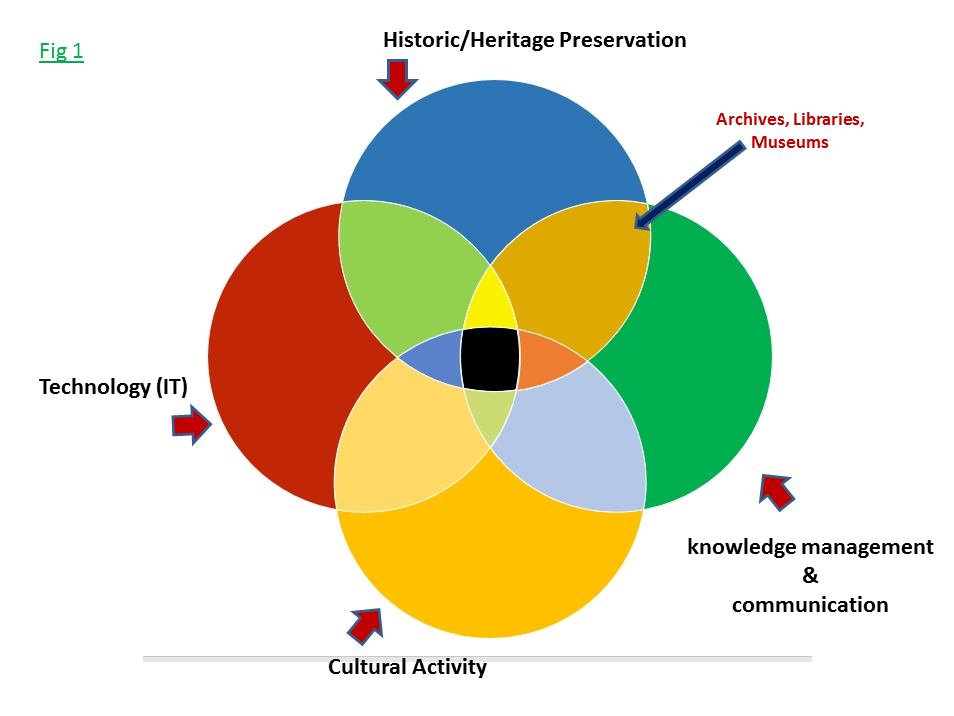
There are at least 4 general overlapping areas of concern for archivists dealing with electronic records. I will generally label them as historic/heritage preservation, knowledge management and communication, cultural activity (which can be business, government, art, etc.), and technology (particularly computer/cyber technology.) The accuracy of these particular labels at a given time or in a given situation is open for debate, but I think we can generally accept that something like them applies to our situation. (Fig 1)

Fig 1

Archives, libraries, and museums fit in the preservation realm, and to varying degrees in the knowledge management/communication realm (The entire lens shape indicated by the arrow). They each have dealings with the actual activities that produce the records, publications, and communication (museums to perhaps a lesser extent) that is to be preserved, as well as the technology that is used to preserve it. The thing that must be remembered, as obvious as it may seem to the reader, is that there is a relatively small portion of the world of archives that intersects the world of technology. (Fig 2) The cyber world primarily deals with its own components and with areas of activity that are not directly connected with archives.

chart-2-cyber

This may seem an involved way of explaining the relationships, but it is important because it explains that:

  1. Archivists and IT do not usually have the same goals
  2. Archivists and IT professionals do not speak the same language
  3. Archivists and IT professionals frequently cannot understand the needs, each of the other, in areas where they must work together
  4. The areas of activity where archivists and IT professionals must work together include cybersecurity and electronic records

If the majority of IT priorities and resources are focused on areas other than electronic records and cybersecurity in archives, archivists have serious difficulties assuring the preservation and access of the records under their care.

Add to this the following:

  • Cyber technology is advancing much more rapidly than most organizations can afford to implement it. What is implemented is therefore done in a piecemeal fashion as resources allow or demand requires. Most large systems contain technology that was not designed to work together as a system. (This is actually true of most small systems as well.)
  • With few exceptions, data and communication systems are designed to attempt to meet the statutory requirements for record longevity. Historical, long-term, enduring value, and permanent retention, are not concepts that are understood in IT, let alone part of its goals or priorities.
  • Even when cybersecurity is a part of a system, most information technology is not designed specifically with security as a primary system goal
  • Fewer than half of all enterprises have an up to date emergency preparedness/disaster recovery plan, and most such plans that do exist focus only on recovering data necessary to continue the primary function of the enterprise, not recovery of historical data
  • While mobile devices have a part in (or are at least allowed) most enterprise technology systems, security for such devices is minimum at best. Almost none of the applications that do not come with the devices in their original state have undergone complete security testing. “Authorized” app store apps are not usually verified to be sure they have no malicious code or that known patches are in place. (Think about the number of apps that exist and picture the amount of time it would take to verify the code for each.)
  • The vast majority of IT systems, at least one very experienced professional says close to 100%, have inherent weakness in security, efficiency, or even basic ability to function, are composed of components that are incompatible in some fashion. This is because they are not designed by a single project team working with components specifically designed to go together. From an IT point of view, additions and changes to a system that are requested by non-IT personnel are fraught with possible unintended consequences.

Ergo, IT has a lot to deal with providing a secure cyber environment, and often must do so without the proper training or resources, and often with little or no say in what components are added to a system.

Of course, IT folk generally have no understanding of what archivists need and want when dealing with electronic records. The fact that archivists are not usually working on the end of the record life cycle where records are created, let alone involved in the business and management decisions that lead to the activity that creates those records, often leaves us with a bit of uncertainty about what we need or want. We don’t generally see the metadata created in the day to day database governance. The term Internet of Things (IoT) is unusual to most of us, as well as the majority of IT, yet it vastly changed the flow and structure of information systems in the past couple of years. In short, we cannot expect IT to understand us any more than we understand the parameters under which they work. (Note: If you want to know more about the IoT, as with Big Data and “the Cloud”, take what you get from a Google search with a heavy grain of salt.)

When dealing with IT professionals, one must try to get some “buy-in” from them;

  • Cultivate a relationship with a high-placed member of the department, developing a sponsor
  • Know who your techs are, whether the people responsible for your server, your Webpage, backups, or desktop support. Let them know who you are and invite them to ask questions about what you do.
  • Take an interest in any IT-related events, answer surveys, and learn about the IT environment
  • Invite input when planning the storage and access of digital materials
  • Acknowledge that IT generally has fewer resources needed to do the job expected of it (people seem to feel that computers can work magic at times) and accept that you may not be the top priority, but look for ways that you can take some of the load off so your project becomes “low-hanging fruit” and easier to take on.
  • Bring donors into the conversation early so that the importance of the collection or project and the obstacles will be out in the open
  • Once you develop “buy-in” from a high-level IT person, try very hard to stay in the loop as they change positions and responsibilities. Because of the demand for IT professionals, people change jobs frequently. I worked with an institution that listed an individual on their as the one in charge of servers, and found out that there had been four people in the position after he left.

Things to remember when planning your project or system:

  • The network at the institution has likely evolved over a period of time, often in spurts that were not planned, and with multiple groups expecting different things from the network
  • When something new is added to the network, it will affect more things than originally expected. IT networking is in the center of The Law of Unintended Consequences
  • If you run your own network servers and are responsible for your own security, fine. Except that if your network joins another, work must be done by IT to integrate them.

We are all professionals, so we know how to deal with other professionals. At times, I think we tend to fail to understand what we really understand, and think we are being understood when we are not. We also fail to understand exactly what the other person’s job and training are.

The following are just a few examples of misunderstanding from my recent experience:

1) I spent almost my entire time at my last position trying to get university storage for high resolution video of television programs with members of Congress on them. Somebody from IT contacted at least once every 6 months to ask if I was finished with the storage. Sometimes whoever called stated they understood we were trying to keep these files permanently, but still wanted to know how soon they could be removed. (The head of one of the IT divisions is also an archivist. Knowing we were friends, someone went to him to ask why I wanted to keep electronic materials for so long. When the tech realized he just didn’t understand, he asked the division head “Is this one of those history things you guys do?” The head said yes and the tech gave up.)

2) I have discovered in some of the databases provided by Lockheed Martin some major mistakes in which the data was to be found in some dates. Constituent numbers entered as correspondence number, etc. Really rough stuff. I also figured out why the database indicated in multiple locations that there was correspondence in the database that was not there. It all had to do with changing systems during the tenure of the member of Congress. IT decided that this was useless data and wished to dump it. I decided that it showed us that correspondence had come in during that time, even if we did not have it, and that it showed where the technology changed in the office. IT could not understand why I would want to know that. A project archivist found even dirty data later on.

A relational database is designed to function in a special way. The data may have some meaning to some people if printed in a specific way, but when it functions in the work environment, it pulls data from different places to provide the information needed, and those places may not always be where one might expect. It performs calculations, logical queries, and sorts data. The data is not really stored in tables, only assembled that way for the viewer, and if a specific order is not needed and specified, it may arrange differently each time used. Think sort of 3-dimensional, 4-D if you include time. Functionality is an aspect of the database that must be preserved for the records to have meaning. I have had multiple archivists tell me that they just print the tables and save them as files. Think taking a picture of a tree and expecting that to represent the entire tree, through the change of seasons at that.

3) Data backup is a strange animal. The term is used generically to cover various forms of backup. In the entire time I held an archival position, I could not persuade my boss that the institution did not have a full, bit-to-bit copy of our 10T drive share somewhere. To IT, backing up the index was adequate, as it was the most likely part of the data to be damaged. If the server itself was taken out, well we were just out of luck. Maybe the boss was better off thinking otherwise.

Where is your data backed up? I have 5 data centers on major college campuses that had complete backups stored less than 200 yards from the primary center. Two are in tornado country, two are prone to flooding (one has the two centers literally sitting on the same river, just a few buildings away.)

At SAA 2015 in Cleveland, I was interested in a vendor who had backup systems that seemed to be affordable for medium-sized repositories, and possibly offer a backup solution for a small cluster of small archives to share. They could be used onsite or as a private cloud. I asked the vendor some questions as he stood there thumbing a stack of business cards he had collected for a prize drawing later. He asked what I did for a living and I told him I was an archivist. He told me that everyone who had submitted a card to his “fishbowl” for the drawing had been required to hand it to him so he could ask them how they kept their data secure, whether electronic records, scanned images, or personal records. He had 72 cards in his hand. He told me I was not only the first person to ask him multiple questions about his products, but that everyone else who answered said they just gave what they got to IT and let them worry about it. This was his first and, he planned, last visit to SAA.

Things to think about!

Note: Most of the specific source material in this post came from personal experience, seminars, and conversations with IT professionals. ISACA and SANS websites have some access to similar materials.

“Thinking Cyber” Part II: Emergency and Disaster Response

by Jim Havron (Independent Archival Consultant)

During the past couple of weeks, I have been trying to assist people and organizations with which I have professional relationships and that have suffered major loss of electronic records and electronic system capabilities. Two institutions are close to each other and have suffered water damage from severe weather. The other has been a victim of a “prank,” causing highly inappropriate language to appear on its Webpage during its annual fundraising drive, as well as to be sent to families of children in their care. Additionally, this site appeared to be the victim of a ransomware attack, although it turned out to be something a little less devastating. Both sets of incidents have brought operations to a screeching halt. Both lost the integrity of their electronic record systems and both permanently lost some of their records. These record collections needed disaster response.

First, I repeat my premise stated in my last post, that it is the archivist who is responsible for the preservation and accessibility of electronic records under their care. When a donor places his/her records into an archivist’s custodianship, the donor expects the archivist to know how to keep them safe and make them accessible.

In general, it is probably safe to say that archival repositories either have dedicated IT staff or do not. If not, it might be that the archives shares IT resources with others, perhaps covered by the enterprise level IT system, or it could mean there are no regular IT staff resources consistently available except from outside sources. (The term enterprise in IT generally refers to something structured over the entire organization, when the organization itself has several components. In a business, it could mean an overarching system covering all the departments, production facilities, etc. University IT staff usually work at the enterprise level, supplying IT support for students, faculty, administration, and research units.) Many organizations with dedicated IT resources actually function as part of an enterprise environment, so they must somehow integrate their own IT into the larger system at some point. Some repositories have totally stand-alone dedicated IT that is entirely within their control. I do not mean by this that they have IT staff that they hire and control but that must still connect with an enterprise system, as is the case with many university libraries.

To summarize the likely situations:

  • Archives is part of enterprise IT system with no dedicated IT support staff
  • Archives is part of enterprise IT system, but has a dedicated IT support staff
  • Archives is a free standing entity and responsible for its own IT support

Regardless of where one fits in this list, it is important to realize that the primary function of most IT operations is to keep things running. The desire is to keep things running securely, but security, in and of itself, is not always the primary function of particular IT operations. The networks, systems, data storage, and end user interfaces (the visible face of the systems that are otherwise behind the scenes) are the realm of the IT staff. Security efforts are prioritized based on the specific IT goals. For example, long-term security of data and the ability to recover it well into the future, is not generally the initial focus of establishing firewall rules and a defensive perimeter. In the IT world, disaster recovery is usually seen as a part of a business continuity plan (BCP), the plan used to recover operations and get things moving again after a disaster, and in many cases is limited in the scope of electronic record recovery.

Query:

Where does preserving historical electronic records, other than for statutory retention time requirements, taking up valuable storage space, and possible use of unusual software that was not designed to fit with the enterprise system, fit in the IT department’s priorities in the event of an incident or disaster? In other words, where does the archival mission fit with the IT mission? The answer may influence how much emphasis an archivist may wish to examine cybersecurity for oneself and one’s institution.

When one is dealing with electronic records, the forms that an emergency or disaster may take are many and varied. Archives and record management profession listserves and electronic communication networks become very busy when we hear of a fire, flood, or other natural disaster that we are trained to recognize and respond to. Electronic records are another matter. Most incidents go unreported and the damage caused may not even be apparent for months or years. Yet to a collection of electronic records, a security incident, whether a hardware failure, system security breach, data corruption, or any number of incidents that may occur, can be at least as devastating, if not more so, than a natural disaster. Because of the large number of records kept in a relatively small physical space, and on a system connected to who knows what, electronic records are extremely volatile and their loss can be devastating.

Are you ready for an electronic records disaster?

Setting aside for the moment the percentage of organizations that have any emergency preparedness/disaster recovery plan (EP/DR) of any kind, let alone one that specifically covers electronic resources as part of the entire organization’s plan, there are steps that an archivist custodian of electronic records can take to help mitigate damage in the event of a disaster. (Research shows that most enterprises in general have their IT data recovery plans, should they exist, as stand-alone plans to be implemented by IT professionals, while an examination of a small sample of cultural heritage organizations showed that of those that had EP/DR plans, 100% left such matters to whoever did their IT, in most cases another department or a contractor.)

To counteract this situation:

  • Archivists should consult with IT staff about where archival electronic records fit in the institution’s incident response plan. This is the plan for dealing with any incident that may be a risk to the integrity of the information system. Such plans range from investigating anomalies in data transfer that may be nothing but a power glitch, to logging unsuccessful attempts at unauthorized system access, to an actual breach of the system, with or without discernable data loss or corruption.
  • Archivists should determine if there is a business continuity plan (BCP), if it includes data recovery, or if there is a specific EP/DR. Regardless of the institution’s plan, determine where the electronic records in your care fit.
  • Archivists should do all they can to be sure they are included in the plans that exist, and to the extent necessary for historic preservation. For example, the BCP goal of getting the network up and running in a specific amount of time might include access to electronic records, but may not include verification that the records have not been stolen, damaged, or altered.
  • Archivists should have a plan for emergencies and disasters, including “incidents” that may be considered security attacks, from their own side of things, [Important!] making sure that they do not interfere with the larger institution’s plans and actions

It should go without saying that one must backup one’s data. Backup, Backup, Backup!!! Initially one should create backups as a stop-gap measure. But before settling in on your standard backup plan, there are some things that really should be done but which are often ignored. All of these may not be feasible for either financial reasons or organizational structure, but all are important.

  • Assess and Evaluate


A threat and risk assessment should be run of your institution, part of which should focus specifically on your electronic collections.

  • The threat assessment will identify potential threats to the institution and records, such as fire, theft, mechanical failure, exterior attack, or other threats. These threats are categorized on a scale from unlikely to unlikely (or in the case of one assessment I did, “oh boy are we lucky that we haven’t gone down the tubes altogether by now!)
  • The risk assessment takes into account the consequences of a particular threat and adds to that the level of damage or loss that would be suffered. It is the risk to the organization or the collections. A small item could be lost and yet be a more devastating loss than a large collection of other material. (e.g.: U.S. Constitution vs the entire collection of video of the local 6:00 news).
  • The importance of dealing with each risk, based on the “value” of the item to be preserved and the “cost” of saving it, along with the likelihood of the need for action is then decided.

The type of backup and quantity of resources required to respond to an emergency should be based upon the above.

It is important that these assessments be carried out by cybersecurity or other qualified IT professionals, in conjunction with the archives staff and any other stakeholders you feel should be involved. Don’t go it alone unless you have no choice, but make sure you are a part of the process.

There are additional steps that one may take to prepare for an emergency. These are just a few:

  • Determine who is responsible for securing your electronic assets and who is responsible for their recovery. If such individuals are not part of the archives staff, determine who on your staff is responsible for notifying and maintaining communication with them. Include alternates; have a Plan B.
  • Train staff, including volunteers, on how to respond to emergencies. If resources allow, train them to recognize and respond to possible cyber-attacks.
  • Conduct drills. Use different emergency scenarios in different drills. May Day and National Cyber Security Awareness Month would each offer convenient times to focus on this if there are not resources for more frequent drills
  • If you have access to people who can conduct penetration testing (test your defenses against risks) or design special cyber-attack training, take advantage of them
  • Remember that the term “the Cloud” is appropriate because it refers to something that is nebulous. The Cloud itself encompasses all manner of data processing, managing and storage activities. The problem is that it is a constantly changing environment that offers great security and use advantages, as well as great security and use liabilities. When you choose cloud storage for backup purposes, you are looking at the produce section of the grocery store. You may think you are comparing apples to apples when in reality it might be apples and oranges, or even kumquats. Cloud storage can be great, but it can also be hazardous. Be careful.
  • Very, very important!!!! Regularly test your backups for integrity and accessibility.

IT and cybersecurity staff tend to function in different worlds from archivists and cultural heritage professionals. With the extremely, and I mean extremely, rapid change in the way that people communicate, create, use and store information, and the growing lack of qualified professionals to safeguard all of this, those who would preserve records of historic value that are in electronic format must be proactive in preparing for possible disaster.


“Thinking Cyber”: Archives and Cybersecurity

By Jim Havron (Independent Archival Consultant)

October is National Cyber Security Awareness Month (NCSAM) and National Archives Month. This is a good match, when one considers the fact that the vast majority of records created and held by organizations of almost any type exist only in electronic format, and the percentage grows well into the upper 90s if one adds those that were created in non-digital formats but only survive as digital copies, and those that may exist in multiple formats but the original (i.e. archival) version is digital. Most of these records are in relational databases, requiring preservation of specialized metadata, database architecture, software, and perhaps specific hardware for the records to be of value. Many archivists must deal with these records directly, and there are probably very few repositories that do not use computers or mobile devices either for their own work, for collection access, or that simply allow use of electronic devices on the premises. If you work in any such environment, cyber security awareness is for you.

Cybersecurity tends to be considered in terms of the Internet or networking. This is certainly a part of it, particularly in a world where the majority of communication seems to be electronic and requires some form of electronic network. The Department of Homeland Security (DHS) is the primary government sponsor of NCSAM, and most of its resources are related to Internet security. Cybersecurity is more than this, however, encompassing all that is computer related. This includes the hardware and software, the Internet and other networks, the physical environment and the people involved. I first heard the term in the early 1980s while learning to work on terminals connected to mainframe computers, and writing programs punched on cards to be loaded into the monster machines. This was before PCs, the Internet, and most of the world we associate with cybersecurity. The majority of cybersecurity work fits in the information technology (IT) realm, but not all. It is significant that the DHS lists 19 areas of cybersecurity that must be approached, and IT is a single, separate area. Cybersecurity includes how people and institutions interact with IT.

I am an archivist and cybersecurity/information systems professional, formerly of the Albert Gore Research Center. Much of my recent work has been in consulting on cybersecurity issues for archives, along with training and presentations that are focused on helping archivists “think cyber.” By this I mean to think about the computers and electronic data as we would shelves, boxes, and paper documents. We should consider their role in the archival environment, including them in our planning and noticing potential security risks in the same way we would notice a patch of mold, signs of vermin, or a change in humidity.

Why does this matter to an archivist? To start with, I refer back to the list of cyber activities and devices in the first paragraph of this post. If not all, practically all archivists have some cyber interaction as part of their jobs, and if any do not, they will certainly have them in the future. Additionally, I will point out that cybersecurity is about the preservation and security of data both in motion and at rest. That means data that is actively in use and data that is in storage. Specialists trained in cybersecurity define preservation and security in terms of “CIA”:

  • Confidentiality– data must be protected in a fashion that allows only those with a legitimate right to access it.
  • Integrity– data integrity is the assurance that data has not been corrupted, damaged, or changed without appropriate authorization. Data integrity is often framed in terms of trust.
  • Accessibility– data must be accessible by those with a legitimate right to access, and available when needed.

Does this sound familiar? In my experience, “CIA” sums up a large part of what we do as archivists.

There are several premises I hold as true regarding archives, electronic records, and related topics. I will not attempt to prove them, just state that they are the context for what I have to share regarding electronic record security. I assert that:

  • Archivists are responsible for the security and preservation of records entrusted in their care, regardless of format. While what is reasonable to expect archaists to to accomplish on their own in this area varies, it is the archivists’ responsibility.
  • IT staff and programs are resources that may be used by archivists, but they are not generally archivists themselves. Decisions of appraisal, arrangement and description, and other functions of the archives profession are not skills taught to IT personnel any more than most archivists learn router and switch configuration, SQL audit, and subnetting as part of their training.
  • While archivists are not usually trained cybersecurity specialists, there are things that they should know and do that make it easier for security staff to do their jobs and allow archivists to be accountable for electronic records, even when they must relinquish much of the physical control to people from another profession.

With these assumptions in mind, here are some basic pieces of information from recent research that might be worth considering when approaching cybersecurity in an archives environment. The goal here is to “think cyber.” Do these things affect your operation, will they in the near future, or are they at least worth speaking about to a security professional?

  • Traditional network cybersecurity is based on forming a defensive perimeter of firewalls, detection software, and similar obstacles to intrusion. Mobile devices for storage and communication often circumvent such perimeters, decreasing security in environments where such devices are allowed.
  • Tests of common antivirus software have shown 55% detection failure rates [author’s note: how quickly a virus is detected is part of the test, and most AV software does eventually find most viruses, although there are some that go undetected. The question is, how long can one allow a virus in one’s system).
  • Except in the case of espionage or “hacktivism,” most attacks are made against targets of opportunity, chosen for the weakness of defenses rather than for the value of what the institution has to protect.
  • In 2015-2016, data corruption and destruction of integrity has moved into the top target actions for attacks.
  • The median amount of time an attacker is in a system before detection has dropped to 146 days in 2015 from 205 in 2014. It was 416 days in 2012. Once on a system or computer, disconnecting from other systems may not remove the threat.
  • Cybersecurity has shifted more in a direction of mitigating damage from a systems breach as opposed to preventing a breach altogether.
  • Constant, or even frequent, network connection is no longer required for a significant number of attack vectors.
  • Social engineering (scams, phishing, manipulation of human activities) is a component of about 75% of all reported security incidents.
  • At least 2/3 of all IT positions in private and public sectors are unfilled.
  • 75% of surveyed CEOs of organizations that have suffered major security breaches in 2015-2016 report that their Chief Information Officer (CIO), or Chief Information Security Officer (CISO) when such existed, did not have the proper skills for the job.
  • Federal, state, and local governments, as well as private sector and grant funding organizations, will have to prioritize where resources are allocated for IT and cybersecurity.
  • In spite of records management plans and sometimes stated goals of preserving cultural heritage and the historic record, most organizations struggle with holding records for even the time dictated by statute.
  • A large number of organizations are turning to “the cloud” for both storage and as part of their actual operations. Surveys consistently demonstrate that different users and different cloud service providers have significantly different understandings of the role of “the cloud” in cyber-operations, and that these roles tend to be somewhat fluid at best.

If any of these facts might affect your operations, please consider what actions you can take to mitigate damage to electronic records or assets should it occur. I will discuss issues with IT, administration, and donors, types of security incidents likely to particularly affect archives, and some strategies for developing a defensive approach to cybersecurity as part of basic preservation in upcoming posts.

Note: Data for this post came from various industry reports by organizations such as Gartner Consulting LLP, Deloitte, Inc., IBM, Verizon, Symantics, NASCIO, and personal interviews. In most cases it is also supported by experience of the author!